
How Much Internet Data Does Streaming Use? (2026 Guide)
By EMTV GENERAL TRADING
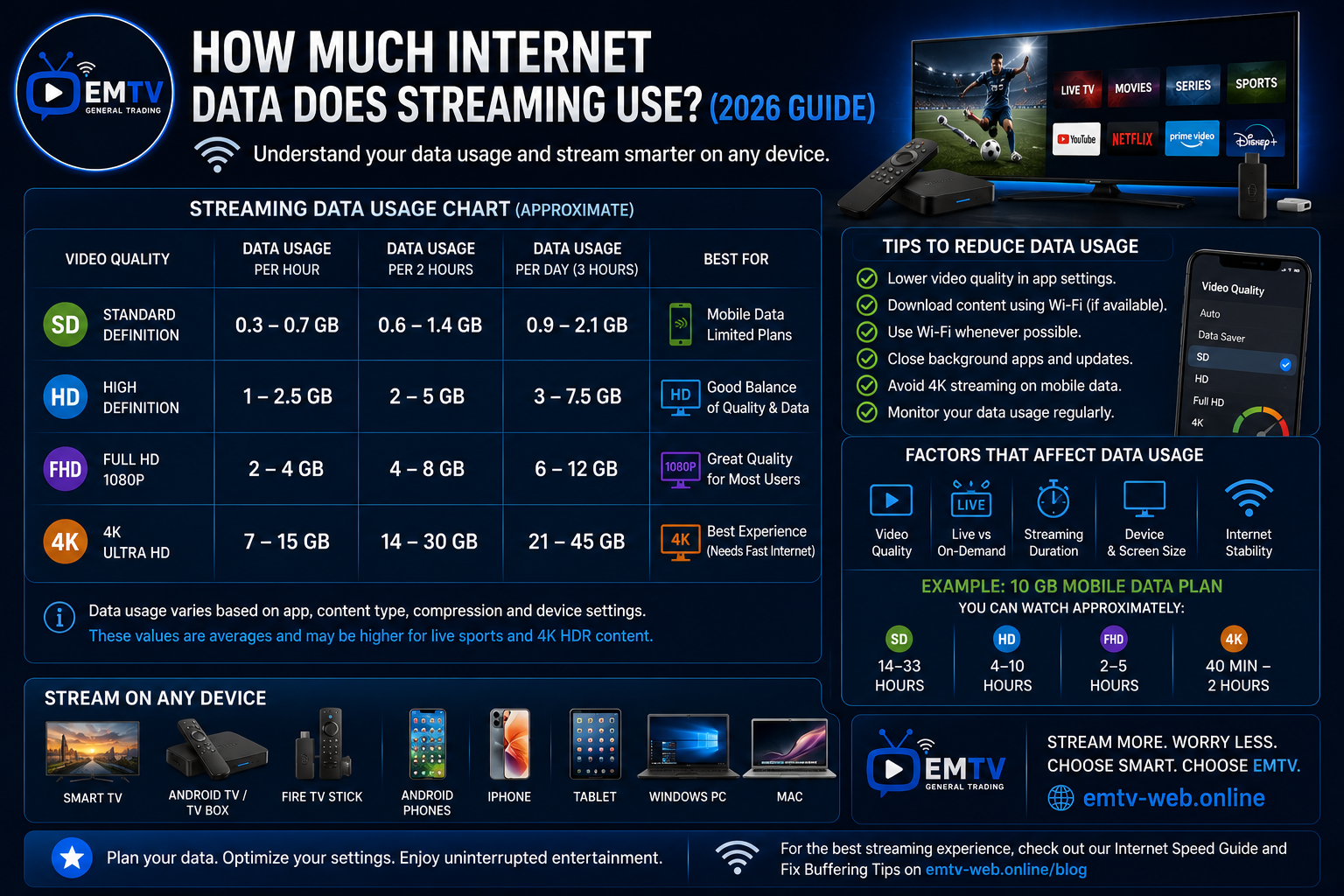
One of the biggest questions people ask before starting to stream is, "How much internet data will I use?"
Whether you're using mobile data or home Wi-Fi, understanding your data usage helps you choose the right internet plan and avoid unexpected costs.
In this guide, we'll explain approximately how much data streaming uses in different video qualities and share practical tips to reduce data consumption without sacrificing your viewing experience.
Why Data Usage Matters
Streaming videos continuously downloads content from the internet.
The higher the video quality, the more data your device uses.
Several factors affect data usage, including:
- Video quality
- Streaming duration
- Device settings
- Compression technology
- Live or on-demand content
Understanding these factors can help you manage your internet usage more effectively.
Estimated Data Usage Per Hour
The figures below are approximate and may vary depending on the streaming service and video quality.
Standard Definition (SD)
Approximate data usage:
- 0.5 GB to 1 GB per hour
Best for:
- Mobile data users
- Smaller screens
- Saving internet data
High Definition (HD)
Approximate data usage:
- 1 GB to 3 GB per hour
Best for:
- Smart TVs
- Android TV
- Tablets
- Everyday viewing
HD offers a great balance between picture quality and data consumption.
Full HD (1080p)
Approximate data usage:
- 2 GB to 4 GB per hour
Best for:
- Movies
- Sports
- Family viewing
- Larger televisions
4K Ultra HD
Approximate data usage:
- 7 GB to 15 GB per hour
Best for:
- Premium home entertainment
- Large Smart TVs
- Fibre internet connections
Because 4K uses significantly more data, it's recommended only if your internet plan comfortably supports it.
Live Sports vs Movies
Live sports often consume slightly more bandwidth because of the constant movement and real-time nature of the video.
Fast-moving content such as football, Formula 1 and basketball may require more consistent internet performance than slower-paced movies or TV series.
Tips to Reduce Data Usage
If you want to save internet data while streaming:
- Lower the video quality from 4K to HD or SD.
- Use Wi-Fi whenever possible instead of mobile data.
- Download content for offline viewing if the service supports it.
- Close apps running in the background.
- Monitor your monthly data usage through your internet provider.
These simple adjustments can significantly reduce data consumption.
Which Internet Plan Should You Choose?
The best internet plan depends on how often you stream.
If you watch occasionally on one device, a moderate data plan may be enough.
If your household streams on multiple devices every day, consider a higher-capacity or unlimited internet plan for the best experience.
Compatible Devices
Streaming is available across a wide range of devices, including:
- Smart TVs
- Android TV
- Android TV Boxes
- Fire TV Stick
- Android Phones
- iPhone
- Tablets
- Windows PC
- Mac
Choosing the right device and internet plan helps ensure smooth and enjoyable entertainment.
Frequently Asked Questions
Does HD use a lot more data than SD?
Yes. HD provides better picture quality but also uses considerably more data than Standard Definition.
Is Wi-Fi better than mobile data?
For regular streaming, Wi-Fi is usually the better choice because it is often faster, more stable and may have higher or unlimited data allowances.
Can I reduce buffering by using more data?
Not necessarily. Buffering is usually related to internet speed and connection stability rather than total data allowance. A stable connection is just as important as the amount of data available.
Final Thoughts
Streaming doesn't have to consume all your internet data. By understanding how different video qualities affect data usage and adjusting your settings when necessary, you can enjoy smooth entertainment while keeping your data costs under control.
Whether you're streaming on a Smart TV, Android TV, Fire TV Stick or mobile phone, choosing the right internet plan and video quality will help you get the most from your viewing experience.
For more streaming tips, device guides and installation tutorials, visit https://emtv-web.online and explore the latest resources from EMTV.
EMTV GENERAL TRADING
Your Entertainment, Our Priority.
Ready to enjoy EMTV?
Pick a package and activate instantly, or test EMTV free for 24 hours on your device.