How to Turn Any TV Into a Smart TV (2026 Complete Guide)
By EMTV GENERAL TRADING
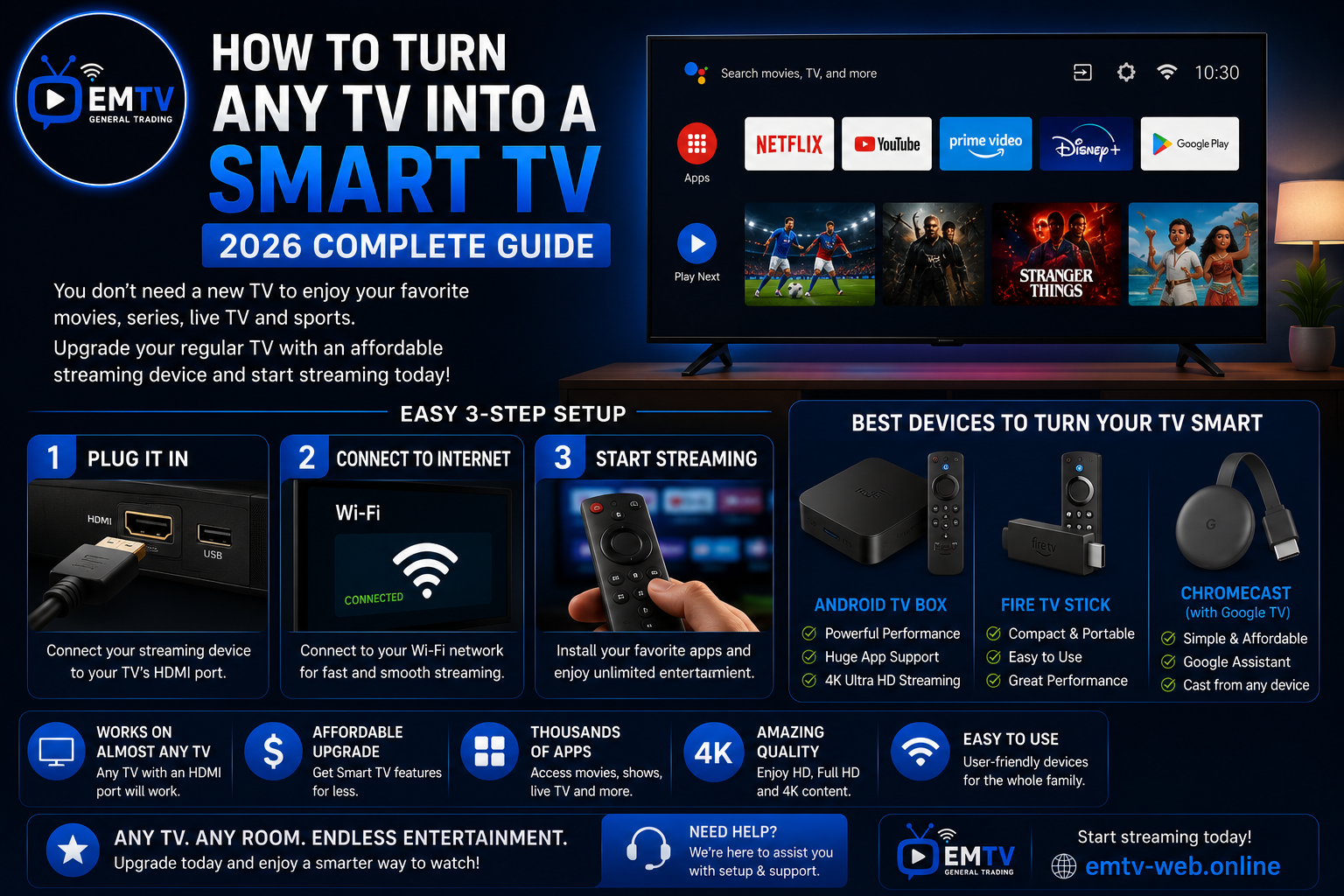
Do you have an older television that still works perfectly but doesn't support streaming apps? The good news is that you don't need to buy a brand-new Smart TV to enjoy modern entertainment.
With a few affordable devices, you can turn almost any TV with an HDMI port into a Smart TV capable of streaming live TV, movies, series and more.
In this guide, we'll show you the easiest ways to upgrade your television in 2026.
What Is a Smart TV?
A Smart TV connects to the internet and allows you to use streaming apps without needing a separate device.
Typical Smart TV features include:
- Live TV streaming
- Movies and TV series
- Sports
- YouTube
- Music apps
- Internet browsing
- App downloads
If your current TV doesn't have these features, you can easily add them.
Can Any TV Become a Smart TV?
Yes.
If your television has an HDMI port, you can upgrade it using an external streaming device.
This means many LCD, LED and Plasma TVs can still provide a modern streaming experience without replacing the television itself.
Option 1: Android TV Box
An Android TV Box is one of the most popular upgrades.
Advantages
- Access to thousands of apps
- Google Play Store support
- Powerful performance
- Supports HD and 4K streaming
- Expandable storage on many models
Best for:
- Home entertainment
- Families
- Frequent streaming
- Watching live sports and movies
Option 2: Amazon Fire TV Stick
The Fire TV Stick plugs directly into your TV's HDMI port and transforms it into a streaming device.
Advantages
- Compact design
- Easy installation
- Fast performance
- Portable
- User-friendly interface
Best for:
- Bedrooms
- Travellers
- Small spaces
- Everyday streaming
Option 3: Chromecast with Google TV
Chromecast allows you to stream content from your phone while also providing access to a modern Google TV interface.
Advantages
- Simple setup
- Voice search
- Google Assistant support
- Works with many popular streaming apps
How to Set Up Your Streaming Device
Getting started is simple:
1. Connect the device to your TV's HDMI port.
2. Connect the power cable.
3. Turn on your TV and select the correct HDMI input.
4. Connect the device to your Wi-Fi network.
5. Sign in or install your preferred streaming applications.
6. Start enjoying your favourite entertainment.
Most setups take only a few minutes.
What You Can Watch
Once your TV has been upgraded, you can enjoy:
- Live TV
- Movies
- TV Series
- Sports
- Kids' Entertainment
- Music
- Educational Content
- News
Your television becomes much more versatile without needing to replace it.
Compatible with EMTV
EMTV supports a wide range of devices, including:
- Android TV
- Android TV Box
- Fire TV Stick
- Smart TVs
- Android Phones
- iPhone
- Windows PC
- Mac
This flexibility allows you to enjoy entertainment on the device that best suits your home.
Frequently Asked Questions
Do I need a new television?
No. If your TV has an HDMI port, you can usually upgrade it using a compatible streaming device.
Which upgrade is best?
Android TV Boxes are ideal for users who want maximum flexibility and app support, while Fire TV Stick is perfect for those looking for a simple and portable solution.
Will streaming devices improve picture quality?
Streaming devices can provide HD or 4K content if your TV and internet connection support those resolutions.
Final Thoughts
You don't need to spend a fortune on a new television to enjoy modern streaming. Affordable devices like Android TV Boxes, Fire TV Stick and Chromecast can transform your existing TV into a Smart TV in just a few minutes.
By choosing the right device and maintaining a stable internet connection, you can enjoy live TV, movies, sports and series on almost any television.
Visit https://emtv-web.online for more streaming guides, installation tutorials and to request your FREE Trial.
EMTV GENERAL TRADING
Your Entertainment, Our Priority.
Ready to enjoy EMTV?
Pick a package and activate instantly, or test EMTV free for 24 hours on your device.